Wednesday, August 13, 2008

The SBS Product Team is coming to your Town!

... Or a town near by.

Below is the schedule, to register for an event, simply click up to the partners web site and register!

City Date
Redmond, WA Saturday, Sept. 6, 2008
Alpharetta, GA Tuesday, Sept. 10, 2008
Charlotte, NC Wednesday, Sept. 11, 2008
Fort Lauderdale, FL Thursday, Sept. 11, 2008
Houston, TX Friday, Sept. 12, 2008
Cincinnati, OH Monday, Sept. 15, 2008
Downers Grove, IL Tuesday, Sept. 16, 2008
Irving, TX Wednesday, Sept. 17, 2008
Minneapolis, MN Thursday, Sept. 18, 2008
South Field, MI Wednesday, Sept. 17, 2008
Waltham, MA Thursday, Sept. 18, 2008
New York, NY Friday, Sept. 19, 2008
San Francisco, CA Monday, Sept. 22, 2008
Irvine/LA, CA Tuesday, Sept. 23, 2008
San Diego, CA Wednesday, Sept. 24, 2008

Monday, August 11, 2008

Wednesday, August 06, 2008

Curious about the SBS 2008 migration process?

Today the Small Business Server User Assistance team has finished writing up the technical documentation for the Migration from both Windows SBS 2003 to Windows SBS 2008, as well as Windows SBS 2008 to Windows SBS 2008.  The documentation is available on the Windows SBS 2003 Technical Documentation Library.

Direct links if you're interested are here:

But wait, there is more, what if you're on site and you don't have access to the web while doing the migration.  The UA team has you covered there with the offline, complete migration help CHM File.

Get familiar, use the Public Beta to practice.

Monday, August 04, 2008

What's Different between SBS 2003 and SBS 2008?

I thought it might be worth doing a post to call out the major things that are different between Windows Small Business Server 2003, and Windows Small Business Server 2008. I thought doing this in a table format might be helpful.  In this table, I'm comparing directly with the 2003 feature set, I am not discussing added functionality or more robust/secure functionality of which is a lot of the extra effort.

In no particular order ...

Windows SBS 2003 Windows SBS 2008
x86 (32-bit) Only x64 (64-bit) Only
Setup asks technical questions and allows you to place data stores in the UI Setup doesn't ask technical questions, if you want some, look at the answer file to enter the migration path, or make modifications to setup, making it more predictable, easier and faster.
Setup asks you technical questions about your router Setup detects routers at 192.168.x.1 and 192.168.x.255 automatically
Windows Firewall disabled Windows Firewall enabled and protecting the server before setup is finished
Can deploy as Edge NAT box, or Single-NIC Deploy's as Single-NIC only, flexibility for any type of router (hardware or software) to be used in front of SBS.
DHCP can be deployed on Router or SBS server DHCP strongly recommended on SBS server, can disable using advanced console only
Post Setup called "To Do" list Post Setup called "Getting Started" List
Administrator account used, but encouraged to be renamed New Administrator account created during setup, and the built-in is disabled out of the box
Configure E-mail and Internet Connection wizard was 27 wizard pages long
  • Connect to the Internet Wizard for outbound connectivity
  • Internet Address Management Wizard for inbound connectivity, which also configures domain names with participating domain name providers
  • Add a Trusted Certificate Wizard for adding certs to the box
  • Configure a Smart Host Wizard for outbound e-mail smarthost configuration
  • Fix-My-Network wizard for continuous re-runs to reset configuration to factory defaults
User Templates Renamed to "User Roles"
Power User can log into SBS administration snap-in with limited tasks Standard User with administration links, gets additional links in Remote Web Workplace for management of Office Live, Connecting to the server, etc.
POP3 Connector was limited for SSL access, should be used for transition tool only. POP3 Connector re-written to support SSL access to mail accounts.  Continues to be a transition tool.
Remote Web Workplace was on/off for all users Remote Web Workplace can be limited to be used for certain users only (all users by default).
Business-card web-site was a white paper solution to host on the local box
  • Integration with Office Live for configuration of Business card web-site
  • Integration with Office Live for hosted SharePoint
  • Integration with Office Live for AdSense advertising
Backup was NTBackup based, support for USB disk drive and Tape Backup is based on new VSS technology, and is much quicker, but no longer supports tape.
Email Reports Daily and Instant alerts from a defined list An extensible list of alerts and daily reports
Security roll-up of the Server only, patch level of clients only. Security roll-up of the server and clients.  Including Firewall Status, AV status, Patch Status, Malware Status, Free Disk space and others!
Windows Server 2003
Exchange Server 2003
Windows SharePoint Services v2
WSUS v2
Windows Server 2008
Exchange Server 2007 SP1
Windows SharePoint Services v3
WSUS v3
Remote Web Workplace shows all computers to connect to Remote Web Workplace can show all computers, but defaults to a user
Self-Issued Certificate was your responsibility to distribute Handy distribution tool provided that can be taken home on a USB/Floppy drive and installed on remote computers, or windows mobile devices
Single Leaf/Root Self-issued Certificate Root Cert/Leaf Cert combination so renewing the leaf cert doesn't require redistributing the certificate package
No Anti Virus included 120 day trial versions of OneCare for the Server, and Forefront Security for Exchange included.
Folder Redirection is entire network or no one. You can choose which users have their "My Documents" redirected to the server
All files were able to be put on the server You can filter which type of documents are not allowed on the server, such as music files, etc.
Support for Windows 2000 clients and higher Support for Windows XP SP2 clients and higher
Windows Mobile access was always allowed Windows Mobile access can be enabled by user, and devices can be managed through Outlook Web Access.
Two consoles, the Administrators console, and the Power Users console Three consoles, the Administrators console, the administrators console with advanced links, and the MMC console with most native tool consoles already in it.
Single type of CAL Lower price CALs for Standard server & users that aren't using the features in Premium
CALs purchased in 5/25 packs CALs purchased in 1/5/25 packs
User needs to remember links Administrator maintained Vista Gadget for common company links

That's the list I can think of.  If I missed something, feel free to let me know and I will be sure to add it.  Itching to try out the beta? Head over to MultiplyYourPower.com, and register to provide feedback and participate in the community over at the Small Business Server Connect site.

Friday, August 01, 2008

Wednesday, July 30, 2008

So, What's Happening on November 12, 2008?

At World Wide Partner Conference, the Windows SBS team announced November 12th, 2008 as the official launch date for Windows Small Business Server 2008 and Windows Essential Business Server 2008. Activities that day will signal general availability of both products in most markets and via most channels, and will kick off launch efforts worldwide. More information about specific launch activities will be communicated in the future. Code completion of both products and release to manufacturing (RTM) - hand off to our partners and distributors - will occur prior to the November 12 launch.

Hopefully this clears up some of the questions you might have had.

Thursday, July 24, 2008

Windows SBS 2008 Public Newsgroups

You are probably familiar with the Windows Small Business Server 2003 newsgroups.  And you are probably also wondering where are the 2008 newsgroups?  Well, the good news is the newsgroups have started.  The bad news is the spammers have gotten a hold of our 2003 newsgroups, and making them more spam then anything else.

As a result, the public newsgroups have gone to Connect!

Yep, head on over to Connect to sign up for the newsgroups to get an insight view of SBS 2008, even if you don't have time to install the Release Candidate of SBS 2008.

Engage!

Friday, July 18, 2008

SBS Signs off on RC1!

We are one step closer to a final release of the Windows Small Business Server 2008 product. Today we signed off on the last release candidate. To celebrate the sign-off, we decided to dunk our management team in whip-cream


For more information on the last release candidate (known as RC1) visit the Windows SBS 2008 Connect Website. The RC1 will be available to the general public sometime next week, register today to get notified!

Monday, July 14, 2008

Allowing OWA and Mobile Devices to download files from SharePoint and the File-System without a VPN connection

The Power of Exchange 2007 is amazing.  Did you know that with Exchange 2007, that's included with Windows Small Business Server 2008 you can have your Outlook Web Access and Mobile Device users click a link to download files directly from the Internal Company Web Site (http://companyweb) or file shares?

Well, you can and it's easy to use, and easy to configure.

To Enable Remote File Access for Outlook Web Access Users:

  1. Click Start, All Programs, Microsoft Exchange Server 2007, and then select Exchange Management Console.
  2. Once the console opens up, expand Server Configuration and then click on Client Access.
  3. Right-click on the owa (SBS Web Application), and choose Propertiesimage
  4. Once the property page loads, click on the Remote File Servers tab, and click the Allow button.                                                              image
  5. In the pop-up that opens, type in "companyweb" without the quotes image
  6. Click Ok and then Ok again to get back to the console.

Now when users send email with http://companyweb/shared%20documents/myfile.txt as a link in email, Outlook Web Access users will be able to click the link and download the file directly through OWA. 

This technique can be done with file-servers as well, simply by putting the SBS server name into the Allow list.  The user would just put in \\server\share\filename.ext into the email and the user would be able to download it via OWA.

Finally, you can also do this for mobile devices, by switching tabs to the Exchange ActiveSync tab and repeating the same steps.

Thursday, July 10, 2008

Windows SBS 2008 Certificate Installer

Windows Small Business Server 2008

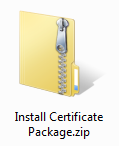
Install Certificate Package

A couple of days ago, I made a post to help you understand the self-issued certificates.  Today I wanted to extend on that and show what's been built for 2008 to help you install the self-issued certificate.  If you open the Company Web Site inside the company, you'll notice an announcement that tells users how to obtain this package.  They can browse to "\\contoso-server\users\public downloads" on the server and obtain the zip file shown on the left.  This zip file can then be copied to a USB key or floppy drive and taken to the remote PC.  Alternatively, it can be run inside the network to install the certificate onto a Windows Mobile device that is connected to the user's PC.  It is not necessary to use this package on client computers that are joined to the domain because Group Policy will push the certificate to these client computers, for the case of a laptop that leaves the domain, it will already have the certificate installed in the trusted root store.

One thing to note, is that each time the Fix My Network wizard is run, it checks the validity of the certificate, if it's invalid, it'll go ahead and re-create the certificates and fix everything up for you.. including dropping a new package to the Public Downloads share.

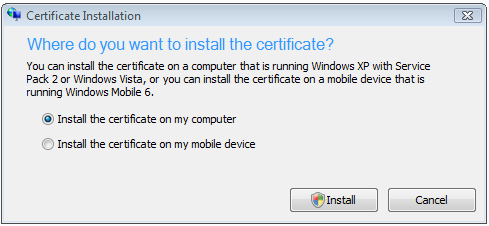
Once you have the tool at the remote location, un-zip it, and run it.  The tool is very simple, and runs on XP SP2 or higher clients, including Vista.  When you run it, you will see the following UI:

image

As you can see from the screen shot, you can install the certificate on the remote PC, or any device running Windows Mobile 6.

While using self-issued certificates got easier with 2008, its still a pain to have to install the certificate every 5 years onto remote devices, it's far easier to use a Trusted Certificate.

Wednesday, July 09, 2008

SBS 2008 Migration PM with a Demo!

Hey look! The videos are just rolling out this week. Up now is the Migration PM, Chris Almida and his video demo of the product! Watch this video to learn all about the steps in a migration and how easy it is compared to the Microsoft migration solution for SBS 2003! Chris has done and outstanding job on the migration path to SBS 2008


SBS 2008 Migration demo and interview


If you want to read and comment on the post, visit TechNet Edge.