Showing posts with label Office 365. Show all posts

Monday, April 29, 2013

Cloud Sharing your Email, Contacts, Calendar Between Different Devices

I’ve come across a lot of people who still struggle with different devices and having to physically plug them into their computer when they want to sync their calendar or contacts.  Sure, Email is a solved problem for them, but not that pesky Calendar or the list of Contacts.  This post is intended to help those people.  But those people have to embrace “the cloud”…

The cloud sounds scary, but it’s not, you’ve been using it for years, it’s just a server on the Internet that’s always accessible. Sure this can be a single mail server that’s been holding your email until you connect it, or it can be a scale-out solution that offers compute, storage, and database needs, but let’s start small.  Your email server, is in the cloud.  Yes, that same one offered to your by your Internet Service Provider (ISV).  That’s “cloud”.  See, you have email, you’re already using “the cloud”.  Your problem is you either (a), have an e-mail only server that uses POP3, or (b), you’re not taking advantage of the features of your server to leverage contacts and calendar.

If you have an e-mail server that only does email (i.e. only offers you IMAP or POP3 access), then you are living in the stone ages.  IMAP and POP3 are to email what rotary dialing is to the telephone.  The first is to switch to something that offers the email, calendar, contact suite of products.  I find it best to switch to the product that your spouse or significant other is using, primarily because it makes it easier to share things like the calendar.  My preference is Outlook.com, but you can also use GMail or Yahoo! Or if you wanted something more powerful, you could choose Office365.  The bottom line is you need to ditch that ISV email server.  Some ISVs leverage the above services for their email solution.  That’s better than POP3, but I still don’t like being tied to an ISV, because if you move or that ISV gets bought by another, things change, but this is your call.  This may or may not require you to get a different email address.  This is by far the most painful part of the process, so you’ll want to do this part once.  If you want to use your own domain name, so your email address never needs to change.  I have instructions on how to do this with Hotmail / Outlook.com.

Let’s overview the set up that you’re aiming for:
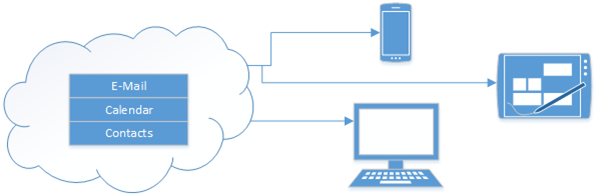
Cloud to Device


This means that each phone, tablet or computer connects directly to the Internet (or cloud) to get your Email (which it does today) and your calendar and your contacts.  This means that the primary location for your E-mail, Calendar and Contacts is in the cloud.  Your devices and computers are just a “view” into that.  While you probably won’t need this with today’s devices. All of my computers are configured to use Exchange Active Sync (EAS).  Apparently Google is the only service that doesn’t use this anymore.

This works for me, and allows me to share my calendar with my wife, so we can always be in sync (provided she enters her events into her calendar!). 

I have the following devices, that are always up to date and never need to be plugged into a computer for “syncing”.

  • Windows Phone 8
  • Surface RT
  • Windows 8 PC (both built in e-mail client, and Outlook 2013)
  • iPhone
  • iPad
  • Blackberry Playbook

This is the set up you “don’t” want, as you are now dependent on your computer, and if you’re computer crashes, or dies, you loose your calendar and contacts.

Bad Setup

Thursday, October 11, 2012

Windows Server 2012 Essentials RTM!! (and Eval today!)

Well, The product formerly known as Windows Small Business Server 2012, is finally at RTM!  This was the last version of SBS I had the pleasure of working on, owning the storage system from the ground up as well as the initial design of the Online Backup functionality.  Of course a lot of things change when you leave a team before the first major milestone, so I can’t wait to fire this one up and see where the teammates I left behind took this product.

According to the Office Blog Post on the RTM announcement, the product highlights include:

  • Enable a dynamic, modern work style with access from your devices by using Remote Web Access (RWA), and take advantage of Windows Phone 8 and Windows 8 devices for a superior experience with rich modern “My Server” apps.
  • Enjoy peace of mind knowing that your data is well-protected by complementing your on-site backups with Windows Azure Online Backup, as well as utilizing integrated support for the new Windows 8 File History feature.
  • Choose the email and collaboration option that’s right for you, whether that’s in the cloud with Office 365 or a hosted service provider, or running on a local server.
  • Quickly and easily respond to increasing data capacity needs with support for Storage Spaces, which allows you to create elastic, resilient storage for your files and folders.
  • Run the line-of-business applications that you depend on by leveraging our greatly improved application compatibility, now with a single logo certification for all Windows Server 2012 editions.
  • Purchase with confidence knowing that your technology investment can easily grow to Windows Server 2012 Standard if the needs of your business grow.
  • Deploy today with full support for 19 languages, all releasing simultaneously.

If you’re itching to try it like I am, you can pop on over to the evaluation center and download the trial version today, which is also on MSDN or TechNet if you prefer those.

Please join me in congratulating the team on another launch of a fantastic product for small businesses.  And we all know you’re going to hook it up to Office365 right?? Smile

Thursday, June 30, 2011

Using the new Office365 with SBS 2011 Essentials

Over on the Official SBS blog, they have a new post about how you can use Office365 with SBS 2011 for a better together story.

SBS 2011 was designed from the ground up to work with hosted versions of Exchange and SharePoint, such as Office365, or BPOS. But you don’t need to wait for any integration pieces to be in play, you can get started today. Check out these videos for more details:

What you can do Today

What you can do with the Office 365 integration module


Wednesday, January 05, 2011

Happy New Year, what’s in store for you in 2011

First off, I wanted to wish all my followers a very happy new year.  2011 is shaping up to be a killer year for small businesses.  There is so much new Microsoft technology coming out to make business more efficient, it’s hard to keep tabs on it all.  I also wanted to apologize to my followers about my lack of posts.  I’ve just returned from a 5 week paternity leave and before that, I was getting my stuff in order.

First, Windows Small Business Server 2011 Standard edition as Released to Manufacturing (RTM!).  This release is pretty exciting and signifies a number of different milestones both internal to our team, and external to the public.  Let’s focus on the external. 

image

SBS 2011 Standard offers small businesses a completely on premise solution to run their business, including the new Exchange Server 2010 with SP1, SharePoint Foundation Services 2010, and the coveted Server 2008 R2 base operating system, bringing security to a new level.  If you’re familiar with SBS 2008, then you’re in luck, because this product brings a bunch of new functionality, but the learning curve will be super short for you, but it still has enough meat in the product to keep it interesting.

For example, the New and Enhanced features of SBS 2011 Standard are:

  • Windows Server 2008 R2 Standard as the base OS, with it’s added security and speed over the 2008 base platform
  • Exchange Server 2010, with SP1 brings greater reliability and performance to your small business.  In addition to many additional features like resource sharing (my personal favorite)
  • SharePoint Foundation 2010 makes using SharePoint even easier!
  • WSUS 3.0 with SP2 to help you manage patches with ease
  • The new version of Remote Web Access (formerly Remote Web Workplace), with movable widgets.
  • A redesigned http://companyweb
  • Improvements into automated domain management
  • An updated Best Practice Analyzer (BPA)

So it’ll be a few short weeks more before you can get your hands on this baby, just keep in mind the system requirements if you’re already procuring a machine for it.  Exchange needs more RAM than you’d probably think about it.

And coming the first half of this year, is the highly anticipated Windows Small Business Server 2011, which ties to Office 365, a true hybrid in the server market.  You can obtain the public beta for SBS 2011 Essentials here (with a new public preview coming soon!).

Also coming this year is Windows Storage server codename “Breckenridge”, which provides a client backup engine for your SBS 2011 Standard or SBS 2008 installs.  It’s like a win-win situation in 2011.

Finally, for media hounds, Windows Home Server “Vail” is coming as well, which uses Silverlight to stream videos and pictures out to the web, or DLNA 2.0 to stream it inside your home, backup your home PCs, your server.

All three of the above will also leverage an ecosystem of add-ins to extend the functionality of the server of your choice.  As I said, an exciting 2011.